<body onLoad="MM_preloadImages('http://cache.tech-weekly.com/1.png','http://cache.tech-weekly.com/2.jpg','http://cache.tech-weekly.com/3.jpg','http://cache.tech-weekly.com/4.png','http://cache.tech-weekly.com/5.png','http://cache.tech-weekly.com/6.png','http://cache.tech-weekly.com/techweekly.png','http://cache.tech-weekly.com/041107_1/arsgeek.jpg','http://cache.tech-weekly.com/041107_1/feed-icon16x16.png','http://cache.tech-weekly.com/1/00.png','http://cache.tech-weekly.com/1/11.PNG','http://cache.tech-weekly.com/1/44.png','http://cache.tech-weekly.com/1/66.png','http://cache.tech-weekly.com/1/77.PNG','http://cache.tech-weekly.com/1/dhtml-scripts-1.png','http://cache.tech-weekly.com/2/1-20386640.png','http://cache.tech-weekly.com/2/10-49139230.png','http://cache.tech-weekly.com/2/11-47600014.png','http://cache.tech-weekly.com/2/12-10847106.png','http://cache.tech-weekly.com/2/13-73726340.png','http://cache.tech-weekly.com/2/14-67303319.png','http://cache.tech-weekly.com/2/15-35796394.png','http://cache.tech-weekly.com/2/16-24800220.png','http://cache.tech-weekly.com/2/17-10998644.png','http://cache.tech-weekly.com/2/18-47445448.png','http://cache.tech-weekly.com/2/19-27563199.png','http://cache.tech-weekly.com/2/2-23420393.png','http://cache.tech-weekly.com/2/20-2315000.png','http://cache.tech-weekly.com/2/21-10796749.png','http://cache.tech-weekly.com/2/22-24847745.png','http://cache.tech-weekly.com/2/23-51799084.png','http://cache.tech-weekly.com/2/24-82780522.png','http://cache.tech-weekly.com/2/25-12582027.png','http://cache.tech-weekly.com/2/26-60298039.png','http://cache.tech-weekly.com/2/27-69708639.png','http://cache.tech-weekly.com/2/28-67105361.png','http://cache.tech-weekly.com/2/29-25436023.png','http://cache.tech-weekly.com/2/3-37403755.png','http://cache.tech-weekly.com/2/30-81723336.png','http://cache.tech-weekly.com/2/31-50969427.png','http://cache.tech-weekly.com/2/32-60418409.png','http://cache.tech-weekly.com/2/33-54687920.png','http://cache.tech-weekly.com/2/4-10787849.png','http://cache.tech-weekly.com/2/5-84282833.png','http://cache.tech-weekly.com/2/6-19449563.png','http://cache.tech-weekly.com/2/7-80727937.png','http://cache.tech-weekly.com/2/8-ii_blue.PNG','http://cache.tech-weekly.com/2/9-61822091.png','http://cache.tech-weekly.com/3/T1.PNG','http://cache.tech-weekly.com/3/T2.PNG','http://cache.tech-weekly.com/3/T3.PNG','http://cache.tech-weekly.com/3/T4.PNG','http://cache.tech-weekly.com/3/T5.PNG','http://cache.tech-weekly.com/3/T6.PNG','http://cache.tech-weekly.com/3/T7.PNG','http://cache.tech-weekly.com/3/T8.PNG','http://cache.tech-weekly.com/3/T9.PNG','http://cache.tech-weekly.com/pics.tech-weekly/silverlight_bug.gif','')"><script type="text/javascript"> function setAttributeOnload(object, attribute, val) { if(window.addEventListener) { window.addEventListener('load', function(){ object[attribute] = val; }, false); } else { window.attachEvent('onload', function(){ object[attribute] = val; }); } } </script> <div id="navbar-iframe-container"></div> <script type="text/javascript" src="https://apis.google.com/js/platform.js"></script> <script type="text/javascript"> gapi.load("gapi.iframes:gapi.iframes.style.bubble", function() { if (gapi.iframes && gapi.iframes.getContext) { gapi.iframes.getContext().openChild({ url: 'https://www.blogger.com/navbar/4911551107644178445?origin\x3dhttp://tech-weekly.blogspot.com', where: document.getElementById("navbar-iframe-container"), id: "navbar-iframe" }); } }); </script>

Tech Weekly


Subscribe


Mobile View
Privacy Policy

Free WiFi Locator
WiFi Finder
Locate wireless services by a specific address, city, state, country, airport, or zip code.
Tech Weekly Podcast
Subscribe to the Podcast
Catch Tech Weekly Podcast on Ustream Live!
Links
Google Groups Beta
Tech-Weekly
Visit this group
Google Groups Beta
Subscribe to Tech-Weekly
Email:
Visit this group
Tech Gadget of the Week

Portable Internet Access Point
The perfect Tech gift: for free
Ubuntu
Powered By

Free you inner geek
Dynamicdrive scripts free

Creative Commons

Redneck Techy

Free Magazine Subscription
My Blog Log
Download of the Day: Dimension 4
Sunday, November 25, 2007


By default since Windows 2000 your computer is set to automatically synchronize its internal clock with either ntp://time.windows.com or ntp://time.nist.gov servers? So why does your computer clock at work seem to be weirdly off from the "Real World"? Well I know when I used to have the correct permissions to set the time on my PC at work I would change it to match the "Real World" and sure as heck as soon as I rebooted that hunk it would go back to having the wrong time. Well unfortunately in a company or corporate network you most times either do not have "sufficient permissions" to change your clock setting or the network is sending a script out each time you reboot you box to sync. all the computers across the company to have the same time, adjusting for time zones of course if applicable.


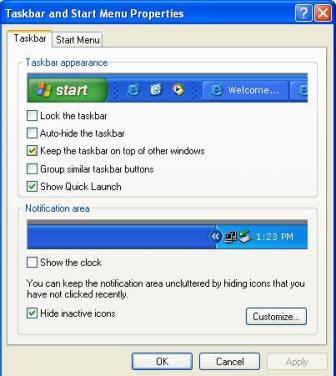
So what does that have to do with this post and download you say? Well as far as work goes I right clicked on my "START" button went to properties and choose the "Taskbar" tab and unchecked the SHOW THE CLOCK option. Might not be the best fix but I have plenty of clocks with the right time on my person and desk to keep me on time at work.
Technorati Tags: ,


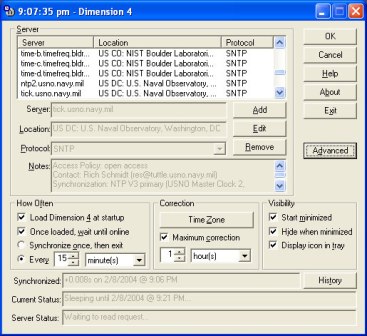
At home its a different story I searched around to find a good way to insure that my clock would reflect the correct time since a lot of my life is based off of either using my Home PC to do something or my laptop. What I found was Dimension 4.


“Simply put, Dimension 4 v5.0 is the fastest and easiest way to synchronize your PC’s clock for Windows-based operating systems. Once Dimension 4 is installed, you’ll most likely forget that it’s even running. It’s that automatic.”


You may think that the incorrect time is a small annoyance that you can handle. Well, so did one of my ‘geek’ friends, until he could not make his encryption work. The authentication for the encryption program was based on the correct current time. If there was a discrepancy in the time, the encryption codes would not work. It took him a good weekend, plus a few days, to find out what the problem was. VIA: Dogreader


Technorati Tags: ,

If you are a bit more comfortable with your computer and do not mind tinkering with the registry a bit here is a solution for you that will not involve running a program in the background.

  1. Open the "CMD" window Click: Start --> Run --> Type CMD
  2. Stop Windows time service type: net stop w32time
  3. Add tick.usno.navy.mil and tock.usno.navy.mil as primary and secondary time servers, retain time.windows.com and time-b.nist.gov as third and fourth servers: Type the following into the CMD window


    reg add HKEY_LOCAL_MACHINE\SOFTWARE\Microsoft\Windows\CurrentVersion\DateTime\Servers /v 0 /t REG_SZ /d tock.usno.navy.mil
    reg add HKEY_LOCAL_MACHINE\SOFTWARE\Microsoft\Windows\CurrentVersion\DateTime\Servers /v 1 /t REG_SZ /d tick.usno.navy.mil
    reg add HKEY_LOCAL_MACHINE\SOFTWARE\Microsoft\Windows\CurrentVersion\DateTime\Servers /v 2 /t REG_SZ /d time.windows.com
    reg add HKEY_LOCAL_MACHINE\SOFTWARE\Microsoft\Windows\CurrentVersion\DateTime\Servers /v 3 /t REG_SZ /d time-b.nist.gov
  4. Start the Windows time service back up type: net start w32time
  5. Check everything is setup correctly by typing: W32tm /resync

Labels:

Bookmark Site Here:

posted by Tech Weekly @ 5:10 AM  

|
0 Comments:
Post a Comment
<< Home
 
About This Site


Author: Tech Weekly
Contact:

Weekly Poll

Translate this page


Previous Post
Archives
Advertisement
Linux top stories on Digg
© 2005-2008 Tech Weekly Template by Isnaini Dot Com