 Did you ever wonder why IE 7 has two Search windows in it if you have the Google Toolbar installed? Or why you cannot seem to get rid of the one in the top right corner? Well I did and was happy to find a solution to fix this. There is a quick Windows Registry hack you can perform to get rid of the built in search window that IE7 comes with. Did you ever wonder why IE 7 has two Search windows in it if you have the Google Toolbar installed? Or why you cannot seem to get rid of the one in the top right corner? Well I did and was happy to find a solution to fix this. There is a quick Windows Registry hack you can perform to get rid of the built in search window that IE7 comes with.
Go to your "Start" button and choose "Run". Type in "Regedit" and look for this key: HKEY_LOCAL_MACHINE\Software\Policies\Microsoft\Internet Explorer\Infodelivery\Restrictions 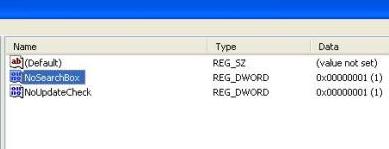 You will need to right click and choose to create a dword entry under that key: Name it "NoSearchBox" and set it to a value of "1" this will get rid of IE7's built in search box if you would like to add it back later simply go back to the above registry key and change the value under "NoSearchBox" to "0" and it will then show up. Of course these changes to the registry may make you uncomfortable. If that is the case and you would like a quick IE7 tweak download that will make the same change as well as also enable/disable the main menu with the File, Edit, View, Favorites, Tools and Help buttons. And place those buttons on top like most of us are used to them being in IE6 and before. And will Hide/Show the command bar to the right of the top of the browser with the various icons on it then you can download: IE 7 Tweak Utility  Labels: IE
|


