|
|
Firefox Friday: Mozilla Weave Extension |
|
Friday, March 7, 2008 |

Pic: FolkenStardust's
As more folks are taking there computer everything with them these days it only makes
sense to have a online source to consolidate your information. I have for the past year
been using Google's Browser Sync. for Firefox, which has worked out okay but left
more to be desired. I did not like the fact that half the time when I would restart my Firefox that I would
be prompted to log back into their service. And though completely functional it was
a bit clunky. That's where Mozilla Lab's Firefox extension "Weave" comes in. The idea is that your
Firefox including: Bookmarks, History, Customizations, Passwords and Preferences
are stored out in the Internet Cloud. This makes all this information accessible from
any Internet enabled computer in the world. And if you pair that with a portable
version of Firefox for you USB thumbdrive then you can literally pickup and move
with your Internet usage all over the place to any computer that has a USB slot. The only hitch is that it is for Firefox 3.0b2pre or greater, Windows/Mac/Linux. 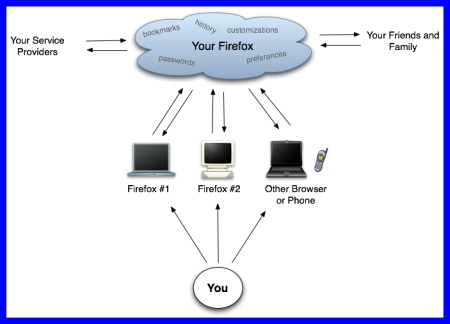
Pic:Mozilla Labs Labels: Firefox Friday
|
Bookmark Site Here:
|
|
posted by Tech Weekly @ 6:00 AM  
| |
|
|
|
|
Web Wednesday: Radio-Locator |
|
Wednesday, March 5, 2008 |

Who needs to find a radio station these days with them being streamed online or via
satellite you ask? Well some of us folks do not yet have satellite radio or HD radios and
this handy little site will locate any radio station in a given area by several different ways. It is amazing how many things can be singled out and found online like this.
Next week I will look at a site that can show you all the Cell towers and antennas
in your area, and place them on a nice Google Map. Too bad this radio locator cannot
do that. It would be handy if you are planning a trip and want to map out which radio
stations you will be able to get during your trip. Well there may very well be a site
out there that does that any know? 
Labels: Web Wednesday
|
Bookmark Site Here:
|
|
posted by Tech Weekly @ 6:00 AM
| |
|
|
|
|
Web Minute: Handy Firefox Keyboard Shortcuts |
|
Tuesday, March 4, 2008 |
 I guess I am a real dummy because of all the different operating systems and applications that I have used over the years with keyboard shortcuts it never dawned on me that Firefox had some really useful ones. The one that I have gripped about internally to myself over and over again is to be able to move from tab to tab in Firefox from the key board. Well I just happened to stumble across an older article at LifeHacker and there they were the easiest and most useful in my opinion keyboard shortcuts for Firefox and they have been around all along. Here they are. I guess I am a real dummy because of all the different operating systems and applications that I have used over the years with keyboard shortcuts it never dawned on me that Firefox had some really useful ones. The one that I have gripped about internally to myself over and over again is to be able to move from tab to tab in Firefox from the key board. Well I just happened to stumble across an older article at LifeHacker and there they were the easiest and most useful in my opinion keyboard shortcuts for Firefox and they have been around all along. Here they are.
Switch tabs right: Ctrl/Cmd+Tab
Switch tabs left: Ctrl/Cmd+Shift+Tab
Select tab (1-9): Ctrl/Cmd+[1-9]
For a more complete list of keyboard shortcuts for Firefox check out this easy to print PDF file from LeslieFrank.com Labels: Web Minute
|
Bookmark Site Here:
|
|
posted by Tech Weekly @ 10:00 AM
| |
|
|
|
|
Tweak Tuesdays: Speedup Firefox Page Loads |
|
|
 In previous posting's I have mentioned several ways that you can tweak Firefox to speed it up. Now there are all kinds of different off the shelf so to speak applications that will make these tweaks for you without you having to even tinker with the inner workings of Firefox. Those are good and I have seen significant browsing speed from my previous tweaks but the one that I want to tell you about today is quick simple and very effective. I now see my webpages load about 50% faster. In previous posting's I have mentioned several ways that you can tweak Firefox to speed it up. Now there are all kinds of different off the shelf so to speak applications that will make these tweaks for you without you having to even tinker with the inner workings of Firefox. Those are good and I have seen significant browsing speed from my previous tweaks but the one that I want to tell you about today is quick simple and very effective. I now see my webpages load about 50% faster.
By going to a blank address bar in Firefox and typing in "About:Config" you can access the inner workings of the Firefox application. This is very similar to changing your Windows registry settings and should be treated just the same be backing up your configurations before making any changes to them. You can do this by going to where ever Firefox is installed on your computer and looking in the profile folder for the profile that you are currently using. If you do not have more than one it would be listed as "Default" you need to copy and save the file called "prefs.js".
Once you have copied that file or if you are confident that any changes you make to the Firefox configuration you can correct then the next thing you will need to do is from the "About:Config" window type into the search filter window:
content.switch.threshold
By default if it exists it should be set to 750000 (approximately 3/4 of a second) but it could be higher than that mine when I went to change it was set at 1000000. I changed mine to 250000 and it was amazing how much faster the graphics and the entire page loaded. I have made this change to my Firefox portable application so that I could test it out on various different speed Internet connections and it has been great on all that I have tried from dial-up to full 10Mb. Labels: Tweak Tuesdays
|
Bookmark Site Here:
|
|
posted by Tech Weekly @ 6:00 AM
| |
|
|
|
|
Mobile Monday: Stompbox make your vehicle a mobile access point |
|
Monday, March 3, 2008 |
 On this weeks Mobile Monday I saw the perfect item referenced on a Systm episode, If you have never watched Systm then I encourage you to take a look. One of the best things is that they now feature Patrick Norton from the old Tech TV. On this weeks Mobile Monday I saw the perfect item referenced on a Systm episode, If you have never watched Systm then I encourage you to take a look. One of the best things is that they now feature Patrick Norton from the old Tech TV.
So how do you make your vehicle a mobile Internet access point? Well there are now a few custom made ways to do this that can be bought ready made for your cellular carrier. That of course is the main thing needed for this to happen. You will have to have an account with a wireless carrier like Verizon or Sprint and get one of their PC Internet cards. The main difference in what the folks at Stompbox did is that they decided they did not want to only have Internet access for themselves and mess around with enabling it to be shared from their laptops what they wanted to do was make a central access point that they could mount in their vehicle that would allow anyone with a wireless accessible device such as a laptop or a handheld to be able to gain Internet access. what the folks at Stompbox did is that they decided they did not want to only have Internet access for themselves and mess around with enabling it to be shared from their laptops what they wanted to do was make a central access point that they could mount in their vehicle that would allow anyone with a wireless accessible device such as a laptop or a handheld to be able to gain Internet access. The folks at Stompbox of course went the extra mile and added trackable GPS location of their vehicle via Google maps and added a wireless webcam to their vehicle that posts a picture to their website every 5 minutes. Imagine the LAN parties you could have in a vehicle like this one. And of course over at Systm they have a great multi-part series on Patrick's truck that they are outfitting with all kinds of mobile tech goodness. When added up the setup that the folks have at Stompbox it comes out to a whopping $980.00 for parts etc... that is not including the monthly Internet charge from the cellular carrier of anywhere from $39.99 a month to $80.00 a month. So is this something I will do in the near future probably not. However, if you are on the road a lot say as a salesperson or maybe you have a band. This might be the route to go you would always have your Internet office with you on the road and not have to worry about stopping at the local Mc D's or Starbuck's to score a quick email check. Labels: Mobile Monday's
|
Bookmark Site Here:
|
|
posted by Tech Weekly @ 6:00 AM
| |
|
|
|
|
| About This Site |
|
Author: Tech Weekly
Contact:
Weekly Poll
Translate this page
|
| Previous Post |
|
| Archives |
- Mar 4, 2007
- Mar 11, 2007
- Mar 18, 2007
- Mar 25, 2007
- Apr 1, 2007
- Apr 8, 2007
- Apr 15, 2007
- Apr 22, 2007
- May 6, 2007
- May 13, 2007
- May 20, 2007
- Jun 17, 2007
- Aug 26, 2007
- Oct 14, 2007
- Nov 11, 2007
- Nov 18, 2007
- Nov 25, 2007
- Dec 2, 2007
- Dec 9, 2007
- Dec 16, 2007
- Jan 6, 2008
- Jan 13, 2008
- Jan 20, 2008
- Jan 27, 2008
- Feb 3, 2008
- Feb 17, 2008
- Feb 24, 2008
- Mar 2, 2008
- Mar 9, 2008
- Mar 16, 2008
- Dec 14, 2008
- Dec 28, 2008
- Jan 4, 2009
- Jan 18, 2009
- Jan 25, 2009
|
| Advertisement |
|
|
| Linux top stories on Digg |
|
|
|


