<body onLoad="MM_preloadImages('http://cache.tech-weekly.com/1.png','http://cache.tech-weekly.com/2.jpg','http://cache.tech-weekly.com/3.jpg','http://cache.tech-weekly.com/4.png','http://cache.tech-weekly.com/5.png','http://cache.tech-weekly.com/6.png','http://cache.tech-weekly.com/techweekly.png','http://cache.tech-weekly.com/041107_1/arsgeek.jpg','http://cache.tech-weekly.com/041107_1/feed-icon16x16.png','http://cache.tech-weekly.com/1/00.png','http://cache.tech-weekly.com/1/11.PNG','http://cache.tech-weekly.com/1/44.png','http://cache.tech-weekly.com/1/66.png','http://cache.tech-weekly.com/1/77.PNG','http://cache.tech-weekly.com/1/dhtml-scripts-1.png','http://cache.tech-weekly.com/2/1-20386640.png','http://cache.tech-weekly.com/2/10-49139230.png','http://cache.tech-weekly.com/2/11-47600014.png','http://cache.tech-weekly.com/2/12-10847106.png','http://cache.tech-weekly.com/2/13-73726340.png','http://cache.tech-weekly.com/2/14-67303319.png','http://cache.tech-weekly.com/2/15-35796394.png','http://cache.tech-weekly.com/2/16-24800220.png','http://cache.tech-weekly.com/2/17-10998644.png','http://cache.tech-weekly.com/2/18-47445448.png','http://cache.tech-weekly.com/2/19-27563199.png','http://cache.tech-weekly.com/2/2-23420393.png','http://cache.tech-weekly.com/2/20-2315000.png','http://cache.tech-weekly.com/2/21-10796749.png','http://cache.tech-weekly.com/2/22-24847745.png','http://cache.tech-weekly.com/2/23-51799084.png','http://cache.tech-weekly.com/2/24-82780522.png','http://cache.tech-weekly.com/2/25-12582027.png','http://cache.tech-weekly.com/2/26-60298039.png','http://cache.tech-weekly.com/2/27-69708639.png','http://cache.tech-weekly.com/2/28-67105361.png','http://cache.tech-weekly.com/2/29-25436023.png','http://cache.tech-weekly.com/2/3-37403755.png','http://cache.tech-weekly.com/2/30-81723336.png','http://cache.tech-weekly.com/2/31-50969427.png','http://cache.tech-weekly.com/2/32-60418409.png','http://cache.tech-weekly.com/2/33-54687920.png','http://cache.tech-weekly.com/2/4-10787849.png','http://cache.tech-weekly.com/2/5-84282833.png','http://cache.tech-weekly.com/2/6-19449563.png','http://cache.tech-weekly.com/2/7-80727937.png','http://cache.tech-weekly.com/2/8-ii_blue.PNG','http://cache.tech-weekly.com/2/9-61822091.png','http://cache.tech-weekly.com/3/T1.PNG','http://cache.tech-weekly.com/3/T2.PNG','http://cache.tech-weekly.com/3/T3.PNG','http://cache.tech-weekly.com/3/T4.PNG','http://cache.tech-weekly.com/3/T5.PNG','http://cache.tech-weekly.com/3/T6.PNG','http://cache.tech-weekly.com/3/T7.PNG','http://cache.tech-weekly.com/3/T8.PNG','http://cache.tech-weekly.com/3/T9.PNG','http://cache.tech-weekly.com/pics.tech-weekly/silverlight_bug.gif','')"><script type="text/javascript"> function setAttributeOnload(object, attribute, val) { if(window.addEventListener) { window.addEventListener('load', function(){ object[attribute] = val; }, false); } else { window.attachEvent('onload', function(){ object[attribute] = val; }); } } </script> <div id="navbar-iframe-container"></div> <script type="text/javascript" src="https://apis.google.com/js/platform.js"></script> <script type="text/javascript"> gapi.load("gapi.iframes:gapi.iframes.style.bubble", function() { if (gapi.iframes && gapi.iframes.getContext) { gapi.iframes.getContext().openChild({ url: 'https://www.blogger.com/navbar/4911551107644178445?origin\x3dhttp://tech-weekly.blogspot.com', where: document.getElementById("navbar-iframe-container"), id: "navbar-iframe" }); } }); </script>

Tech Weekly


Subscribe


Mobile View
Privacy Policy

Free WiFi Locator
WiFi Finder
Locate wireless services by a specific address, city, state, country, airport, or zip code.
Tech Weekly Podcast
Subscribe to the Podcast
Catch Tech Weekly Podcast on Ustream Live!
Links
Google Groups Beta
Tech-Weekly
Visit this group
Google Groups Beta
Subscribe to Tech-Weekly
Email:
Visit this group
Tech Gadget of the Week

Portable Internet Access Point
The perfect Tech gift: for free
Ubuntu
Powered By

Free you inner geek
Dynamicdrive scripts free

Creative Commons

Redneck Techy

Free Magazine Subscription
My Blog Log
Tweak Tuesdays: Shutdown Windows XP Quicker
Tuesday, March 18, 2008

So here are two quick ways to speed up your Windows XP shutdown and if need be restart time. The first one is do away with that awful Exiting Windows .wav file that plays. It slows down the process considerably and I don't know about you but I am tired of hearing it.


All you need to do to silence this slow down is to click your start button then go to:


 settings -> control panel -> Sound,Speech and Audio devices -> Sounds and Audio Devices -> Sounds


Once you pick the "Sounds" tab scroll till you find the Program Event "Exit Windows" and choose the Sounds (None)


You can speed up your Windows XP shutdown time also by making a quick registry change.
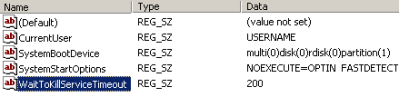


 "Please remember before making any change to your registry to make a backup copy of it somewhere else."


Once you have made your back up copy of your registry then all you need to do is find the following location:


HKEY_LOCAL_MACHINE/SYSTEM/CurrentControlSet/Control


Select the "Control" folder and find the WaitToKillServiceTimeout key and change it from its default setting of 20000 to a much smaller number preferably below 2000 I chose 200.


Once these two easy tweaks are done your Windows XP shut down time will decrease dramatically.


Labels: ,

Bookmark Site Here:

posted by Tech Weekly @ 6:00 AM   0 comments

|
Mobile Monday: Google Calendar Sync
Monday, March 17, 2008

Have you seen the above new red letters on you Google Calendar page? Well I have to admit that this was something that has been out for a couple of weeks and I completely missed it. I usually access my Google Calendar from Gmail via Greasemonkey script so I do not always see the new stuff that they post there. None the less as soon as I saw it I had to load it. And I am extremely happy, I can now have all of my calendars synced and combine both work and home tasks into one view where ever I am at.

How easy is it to do this you ask? Well pretty darn easy. All you need to do is go to the Google Calendar Help page HERE. Click and download the Google Calendar Sync application. Or you can of course download it by clicking the previous link here on my web page. Once you have downloaded and installed this application the first thing that you will be greeted with is a login in window like this.

Once you have made a couple of choices as to how your Outlook Calendar and the Google Calendar are going to interact you click "Save" and the application is off and running.

I had about 189 entries in my combined two calendars and it took only 1 minute for them to sync up. Once that was done I was pleasantly surprised to see all of my information on both the calendars.

I will keep an eye on this application and let you all know if I run into any difficulties. I have seen at the various blog sites that I have visited today after finding out about this application that not all folks are having an easy time with this so definitely use some caution in trying it out.

Labels:

Bookmark Site Here:

posted by Tech Weekly @ 6:00 AM   0 comments

|
About This Site


Author: Tech Weekly
Contact:

Weekly Poll

Translate this page


Previous Post
Archives
Advertisement
Linux top stories on Digg
© 2005-2008 Tech Weekly Template by Isnaini Dot Com